


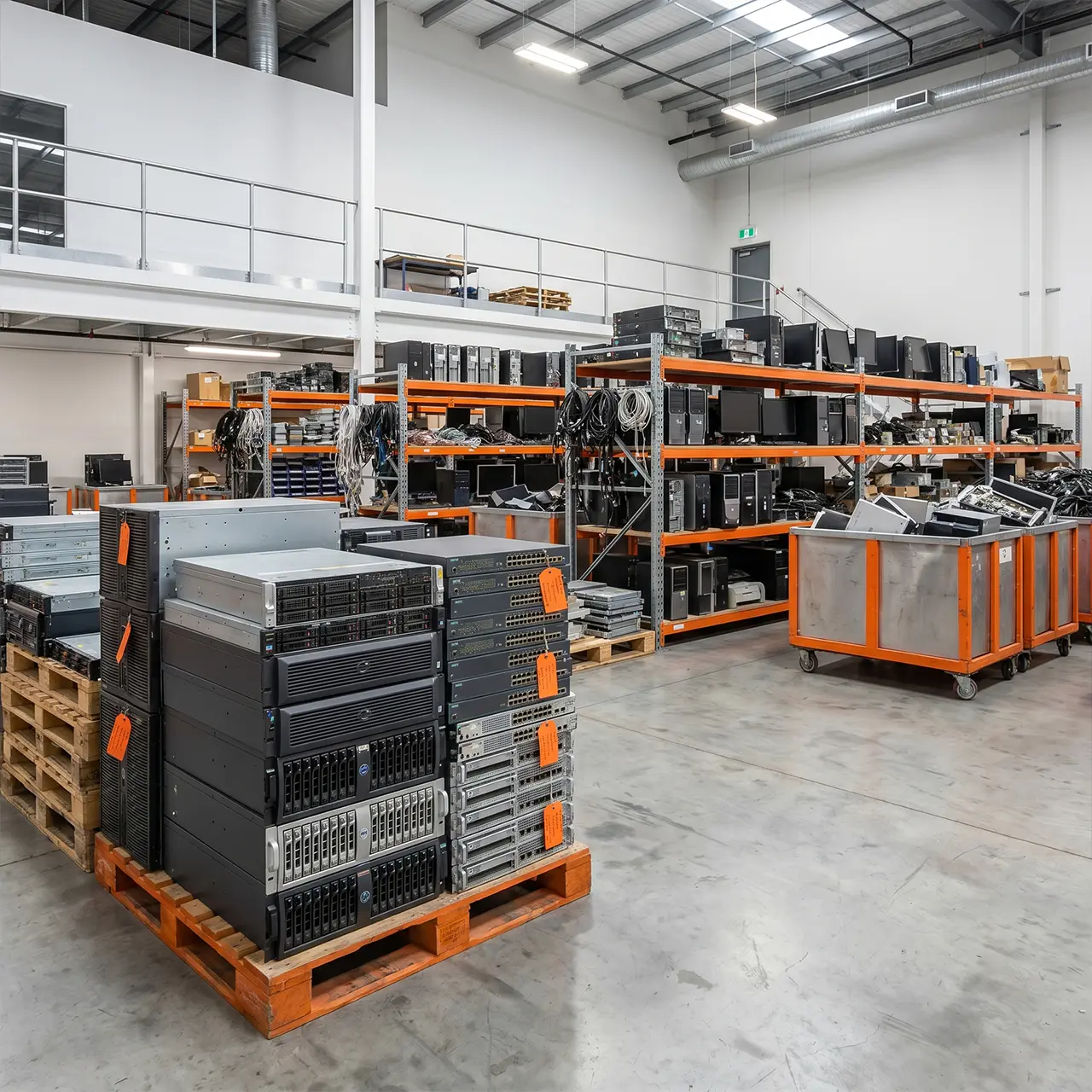
Retired Technology Can Become a Business Risk
Most businesses focus heavily on purchasing and managing technology.
Far fewer think about what happens when that technology reaches the end of its lifecycle.
Old laptops, desktop computers, servers, networking equipment, storage devices, and communication systems often remain in offices, storage rooms, or warehouses long after they stop being used.
While these assets may appear harmless, they can create several challenges:
- Security risks
- Data exposure
- Storage costs
- Asset tracking issues
- Compliance concerns
- Environmental impacts
This is why businesses increasingly invest in professional IT asset disposal Australia services to manage retired technology securely and efficiently.
In this guide, we’ll explore what businesses should do with ageing technology assets and why a structured disposal process matters.
The Problem With Keeping Old Technology
Many organisations hold onto retired technology for years.
Common reasons include:
- Future use planning
- Lack of disposal procedures
- Data security concerns
- Asset uncertainty
- Limited internal resources
Over time, these assets can create unnecessary risks.
Data Security Risks
Devices may still contain:
- Business documents
- Customer information
- Financial records
- Employee data
- Email archives
Storage Challenges
Unused equipment takes up valuable office and storage space.
Asset Visibility Issues
Without proper records, businesses often lose track of what equipment they own and where assets are located.
Environmental Concerns
Technology should be disposed of responsibly through approved recycling and disposal channels.
A structured asset disposal strategy helps address these challenges.
What Is IT Asset Disposal?
One of the most common questions organisations ask is:
What Is IT Asset Disposal?
IT asset disposal is the process of securely retiring, removing, recycling, redeploying, or disposing of technology assets that are no longer required by a business.
The objective is to manage technology assets safely while protecting sensitive information and maintaining asset visibility.
Assets commonly included are:
- Laptops
- Desktop computers
- Servers
- Storage devices
- Networking equipment
- Communication systems
- Mobile devices
- Technology accessories
Professional IT asset disposal Australia services help businesses manage these assets throughout the retirement process.
What Is IT Asset Management?
Asset disposal forms part of a broader lifecycle strategy.
What Is IT Asset Management Service?
IT asset management involves tracking, monitoring, maintaining, and managing technology assets throughout their lifecycle.
This includes:
- Procurement
- Deployment
- Maintenance
- Monitoring
- Upgrades
- Retirement
- Disposal
The goal is to improve asset visibility, maximise value, and reduce operational risk.
Effective IT asset management Australia practices help organisations make informed technology decisions while maintaining accurate asset records.
How IT Asset Disposal Works
Businesses often ask:
How IT Asset Disposal Works
The process typically follows several structured stages.
Asset Identification
Technology assets are identified and reviewed.
This includes:
- Equipment inventories
- Asset registers
- Device audits
Understanding what assets exist is the first step in effective disposal.
Asset Assessment
Assets are evaluated to determine:
- Reuse opportunities
- Redeployment potential
- Recycling requirements
- Disposal requirements
Not all equipment follows the same path.
Data Security Review
Before assets leave business control, data security must be addressed.
Activities may include:
- Certified data wiping
- Data destruction
- Hard drive destruction
Internal Link: Certified Data Destruction Australia
Asset Removal
Assets are securely removed from operational environments.
This may include:
- Collection
- Transportation
- Storage
- Processing
Recycling or Disposal
Where equipment can no longer be used, responsible disposal and recycling processes are implemented.
This supports both environmental responsibility and secure asset retirement.
Why Secure IT Asset Disposal Matters
Many businesses focus on acquiring technology but overlook disposal risks.
Why Secure IT Asset Disposal Is Important
Secure disposal helps businesses:
-
Protect Sensitive Information
-
-
- Retired devices may still contain valuable information.
-
-
Reduce Security Risks
-
-
- Proper disposal helps prevent unauthorised access to business data.
-
-
Improve Asset Control
-
-
- Structured processes maintain visibility throughout the disposal lifecycle.
-
-
Support Sustainability Goals
-
-
- Responsible recycling helps reduce environmental impact.
-
-
Improve Operational Efficiency
-
- Removing obsolete equipment creates a cleaner and more organised technology environment.
Common Technology Assets Businesses Retire
Most organisations regularly replace technology assets.
Common examples include:
Laptops and Desktops
Often replaced every few years to improve performance and security.
Servers
Older infrastructure may be retired during cloud migrations or infrastructure upgrades.
Storage Devices
Storage systems frequently contain large amounts of sensitive information.
Networking Equipment
Switches, routers, firewalls, and communication hardware often reach end-of-life stages.
Mobile Devices
Business smartphones and tablets may require secure retirement procedures.
Professional IT equipment disposal Australia services help ensure these assets are managed appropriately.
IT Asset Disposal and Business Relocations
Technology asset reviews often occur during:
- Office relocations
- Data centre migrations
- Infrastructure upgrades
- Business consolidations
Relocation projects frequently identify assets that are no longer required.
Rather than moving obsolete equipment to a new location, businesses often choose disposal or recycling solutions.
Internal Link: IT Relocation Services Australia: The Complete Business Relocation Guide [P2]
Building an Effective Asset Disposal Strategy
Businesses should establish a structured disposal framework that includes:
Asset Tracking
Maintain accurate records throughout the asset lifecycle.
Data Security Procedures
Ensure information is removed securely before disposal.
Disposal Processes
Create clear procedures for retired technology.
Recycling Standards
Support environmentally responsible disposal methods.
Regular Reviews
Assess ageing assets before they become unnecessary risks.
A proactive approach reduces operational complexity and improves security outcomes.
Signs Your Business May Need IT Asset Disposal Services
You may benefit from professional disposal support if:
✓ Old equipment is stored onsite
✓ Asset records are incomplete
✓ Devices contain sensitive information
✓ Storage space is becoming limited
✓ Technology upgrades are planned
✓ Office relocations are approaching
✓ Infrastructure is being modernised
These situations often indicate opportunities to improve asset management practices.
Final Thoughts
Technology assets have value throughout their lifecycle, including at retirement.
Without proper planning, obsolete equipment can create security risks, operational inefficiencies, and unnecessary storage challenges.
Professional IT asset disposal Australia and IT asset management Australia services help businesses retire technology safely, maintain asset visibility, protect sensitive information, and support responsible disposal practices.
For growing organisations, a structured disposal strategy is an important part of long-term technology management.
IT Asset Disposal Australia: Frequently Asked Questions
1. What is IT asset disposal?
IT asset disposal is the process of securely retiring, removing, recycling, redeploying, or disposing of technology assets that are no longer required by a business. This includes laptops, desktops, servers, storage devices, networking equipment, mobile devices, and other technology assets. The goal is to ensure assets are managed securely while protecting sensitive information and supporting responsible disposal practices.
2. What is IT asset management service?
IT asset management is the process of tracking, managing, maintaining, and monitoring technology assets throughout their entire lifecycle. This includes procurement, deployment, maintenance, upgrades, asset tracking, retirement, and disposal. Effective IT asset management helps businesses improve asset visibility, reduce costs, minimise risks, and make better technology investment decisions.
3. How IT asset disposal works?
IT asset disposal typically begins with identifying and auditing retired technology assets. Devices are then assessed for reuse, redeployment, recycling, or disposal. Before equipment leaves business control, data security measures such as certified data wiping or data destruction are performed. Assets are then removed, processed, and either recycled or disposed of through approved channels, with documentation maintained throughout the process.
4. Why secure IT asset disposal is important?
Secure IT asset disposal is important because retired technology assets may still contain sensitive business information such as customer records, financial documents, employee information, emails, and confidential files. A structured disposal process helps prevent data exposure, reduce security risks, improve asset control, support sustainability initiatives, and protect the organisation from potential data breaches.
5. What happens to retired business technology?
Retired business technology is typically assessed to determine the most appropriate next step. Depending on its condition and business requirements, equipment may be redeployed internally, refurbished, recycled, securely destroyed, or disposed of through approved recycling programs. Before any asset leaves the organisation, data should be securely removed to prevent unauthorised access.
6. How businesses dispose of old IT equipment?
Businesses dispose of old IT equipment through a structured asset disposal process that includes asset identification, data security reviews, certified data wiping or destruction, equipment collection, transportation, recycling, and reporting. Many organisations use professional IT asset disposal services to ensure technology is managed securely and responsibly throughout the disposal process.
7. What devices should be included in IT asset disposal?
IT asset disposal should include any device that stores or processes business information. Common examples include laptops, desktop computers, servers, storage devices, hard drives, SSDs, networking equipment, communication systems, tablets, smartphones, printers, backup devices, and other business technology assets that have reached the end of their lifecycle.
8. How IT asset management improves business operations?
IT asset management improves business operations by providing greater visibility into technology assets, helping organisations track equipment throughout its lifecycle, reducing unnecessary technology spending, improving planning for upgrades and replacements, strengthening security controls, and ensuring assets are properly maintained and retired when no longer required.
